How To Use A Digital Camera Youtube?
If you've recently bought a digital camera or are just looking to make the most of the one you already own, understanding the myriad functions and conquering the sometimes-overwhelming settings is crucial. And what better way to learn than diving into YouTube tutorials and combining them with your own hands-on experience? Whether you're building your foundation or navigating through nuanced techniques, this article covers the essentials, helping you decode digital cameras and maximize YouTube as your learning resource.
Before we jump in, let’s address a quick reality check: modern digital cameras are miniature computers enclosed in a sleek chassis covered in a labyrinth of buttons, dials, and unfathomably deep menus. For beginners—or even experienced users—this can feel like cracking open Da Vinci's notebook without knowing Italian. Fear not! Following step-by-step tutorials on YouTube and practicing with your actual camera can take theory straight into action. Here’s your roadmap to making the most of both.
Master the Basics Before Diving into Tutorials

Before rummaging through YouTube looking for in-depth explanations about aperture priority mode or manual exposure compensation, acquaint yourself with the hardware. Familiarity with your camera makes tutorials far easier to follow. Flip open your camera manual—it’s not as intimidating as it looks (well, usually). Learn where the major buttons and settings are located. Discover the shutter button, on/off switch, mode dial, and menu. Knowing these basics will give you a head start, so when you hear a YouTuber say, “Switch to manual mode,” your hand won’t fumble searching for the dial.

What should you master first? A few useful elements include:
Understanding shooting modes (Auto, Manual, Aperture Priority, Shutter Priority). Auto mode is your safety net; use it if you're feeling overwhelmed.
Learning how to focus manually and automatically. Misfocus ruins photos faster than people blink. Understand single-point focus versus multi-point systems.
Exploring menu options for JPG vs. RAW. YouTube tutorials frequently dive into RAW editing, so toggling this capability can be a game-changer for post-processing.
Finding the Right Content on YouTube
YouTube content can range from intending to educate to simply clickbait (spoiler: “Watch Me Unbox My $5,000 Camera” might not make you a better photographer). To get solid tutorials, start searching for keywords tailored around your exact device. Are you learning to use a Canon EOS, a Nikon Z-series, or perhaps a budget-friendly Fujifilm X-T100? Type a combination of terms like "How to use [Your Camera Model]" or "Beginner photography tips [Your Camera Brand]." Results often include experienced creators offering straightforward insights.
Here’s what you want in your YouTube tutorial hunt:
1. Beginner-friendly guides. Look for phrases like “for beginners” in the titles of videos. Tutorials tailored for novices often come with practical explanations and fewer intimidating terminology drops.
2. Concise but detailed videos. Avoid overly long tutorials unless you're deep into a technical rabbit hole.
3. Interactive instructions. Choose tutorials that show step-by-step visuals, not just talking-head narrations. Watching someone navigate a digital camera menu is considerably more helpful than expert-level verbal shortcuts.
A few creators stand out for delivering top-tier content, like Tony & Chelsea Northrup, Peter McKinnon, and Manny Ortiz. Many photography YouTubers have dedicated playlists for new users—cherry-pick playlists over random fragmented uploads.
Decoding Camera Jargon Through YouTube
If you've ever felt that photo lingo is straight out of a quantum physics textbook, YouTube is your new best friend. Here are common terms you’ll encounter in your camera operation research:
1. ISO Settings: ISO manages your camera's sensitivity to light. Tutorials will demonstrate when to increase your ISO to brighten dim shots (at the expense of noise) or reduce ISO under perfect lighting conditions.
2. Shutter Speed: Learn how to master fast speeds for action shots or slow speeds for dreamy long-exposures. Most YouTubers will walk through visual experiments to establish clear understanding.
3. Aperture: Represented by f/ numbers (e.g., f/1.8, f/5.6), aperture tutorials will show you how to manipulate depth of field, giving you that creamy background blur or sharp landscapes.
4. Exposure Triangle: The bread-and-butter of photography tutorials will discuss ISO + Shutter Speed + Aperture as a trinity. Watch as creators enthusiastically connect settings to scenarios.
A classic tip: follow tutorials where the personality aligns with your temperament—for example, humorous creators if you like wit, or super-focused users if you want ultra-clear step-by-step guides.
“Pause, Try, Repeat” — The Secret Success Formula
You’ve loaded up a carefully selected tutorial—now comes the fun part. This three-step learning loop should dominate your YouTube camera-building journey:
1. Pause: An excellent tutorial walks through camera settings at a practical pace—either internal buttons or referring to external adjustments like navigating the menu screen. Pause wherever possible to digest and translate their tips directly to your actual camera interface. A surprisingly large number of users prefer following guides passively; don’t be passive; engage!

2. Try: After understanding the concept (e.g., “Adjust to f/2.8 for a shallow depth of field”), try applying that advice practically. Head outdoors or to your nearest well-lit room to test. This trial solidifies abstract knowledge into physical reality.
3. Repeat: Tutorials discussing dynamic shooting modes (e.g., switching between shutter priority for time-lapse video or aperture priority for low-light portraits) require repetition. Don’t be afraid of mistakes—it’s just proof you’re on the road to mastery.
Setting YouTube into Photography Workflow
Eventually, transition beyond YouTube as your exclusive learning resource. Tutorials are stepping stones; mastering your camera ceaselessly happens behind the lens. Pay close attention during YouTube walkthroughs explaining advanced lessons alongside your environment, like:
- Adjusting white balance to match indoor or outdoor lighting conditions.
- Leveraging histogram analysis (many devices measure brightness distribution—YouTube explains graphical interpretation as a visual exercise).
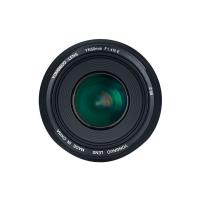
- Exploring lens choices like prime lenses over zoom lenses for creative edge.
Finally, move from documenting techniques to reviewing results. Combine a basic editing platform like Adobe Lightroom (tons of free YouTube Lightroom classes abound) or Snapseed to post-process improved RAW files. Combining YouTube knowledge acquired earlier using unedited files translates better contrast and artistic purity.
Closing Thoughts
You are not alone: thousands of aspiring photographers regularly rely on YouTube tutorials to elevate their craft. But the critical takeaway is pairing online insight with in-camera trial-and-error. Learning a new digital camera, with its high-tech sensors and complex features, can feel overwhelming—but it’s fundamentally about breaking down tasks into easy, digestible elements.
So, head to YouTube, upload “digital camera tutorials,” and let creators like Peter McKinnon hold your virtual hand through aperture settings, shutter speeds, and exposure triangles. With practice and patience, you’ll outgrow beginner guides faster than you think—and who knows, you might even open your own YouTube channel someday to teach others how to wield their magical photo machine!