
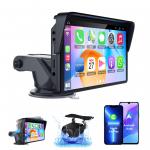
Portable Apple Carplay Screen for Car, 7 Inch IPS Touchscreen Car Stereo Support Wireless Carplay&Android Auto, AirPlay, Bluetooth, Mirror Link/Mic/TF/USB/AUX for All Vehicles Kentfaith
SKU: GW41.0097
Q
Bluetooth cannot connect
Answer Question
A
Go to the settings of your mobile phone. 2. Select "Bluetooth". 3. Keep only up to 5 Bluetooth connection records.
Delete any Bluetooth connections that exceed the limit of 5. 5. Try to connect the Bluetooth again.
Related products
Guess you like products

Related articles

Guess you like articles
Related searches
Connect Multiple Bluetooth Speakers
Ps4 Connect Bluetooth Headphones
Bluetooth Headphone Tv Connect
Connect Two Bluetooth Speakers
Connect Two Bluetooth Headphones
Ps5 Connect Bluetooth Headphones
Connect Selfie Stick Bluetooth
Connect Jvc Bluetooth Headphones
Connect Multiple Bluetooth Earphones
Connect Multiple Bluetooth Speakers Android