What Is Exposure On Dash Cam?
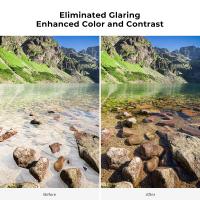
Exposure on a dash cam refers to the camera's ability to regulate the amount of light that hits its sensor when capturing footage. Essentially, it determines how bright or dark your recorded video will appear. Managing exposure is a delicate balancing act; too much exposure can lead to washed-out footage where details are lost in overly bright areas, while too little results in dark, underexposed videos where crucial elements might be engulfed in shadows. Dash cams often come with automatic or adjustable exposure settings to compensate for varying lighting conditions, such as the sharp contrast between daylight and nighttime, or transitioning from shaded to sunny areas.
When we talk about exposure in the context of dash cams, we’re delving into one of the pivotal elements of video quality, particularly in environments like roads and highways where lighting conditions are highly variable. Have you ever reviewed dash cam footage only to see that an accident or important detail was obscured by extreme brightness or darkness? That’s exposure mismanagement in action. Before you give up hope and label your dash cam as "that annoying piece of tech on my windshield," allow me to walk you through why exposure is a misunderstood hero and what to do about it.
Brightness Meets the Laws of Physics
When light enters your dash cam, the sensor inside interprets it. This sensor is like a nerdy librarian—its job is to organize incoming data (light) so it makes sense to the viewer (you). If a truck cuts you off on a highway during high noon, your dash cam might need to "down-regulate" the light inputs so the scene doesn't look like it was filmed on the surface of a star. Conversely, during dimly lit times like twilight or dark tunnels, the dash cam has to "crank up the sensitivity" to capture details in the shadows.
The action of altering exposure relies on metrics like ISO and shutter speed. ISO is essentially the sensitivity of the camera to light, while the shutter speed determines how long the camera’s sensor is exposed to light. Together, these two factors harmonize to deliver clearly exposed footage. Most dash cams do this automatically through a setting called Automatic Exposure Correction—basically the camera’s way of saying, “I got this.”
Challenges with Dash Cam Exposure Adjustment
Life on the road isn’t a controlled studio setting. Your dash cam may face direct sunlight, streetlights, headlights from oncoming vehicles, or sudden flashes of light during lightning storms. These fluctuating conditions can confuse the camera sensor.
Low-Light Scenarios
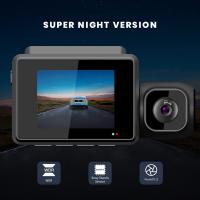
When driving at night, an improperly tuned dash cam often fails to deal with the lack of ambient illumination, producing grainy or dim footage. You know—the kind of videos where a speeding car looks more like a ghost. Many modern dash cams address this by incorporating technologies like Wide Dynamic Range (WDR) or High Dynamic Range (HDR). These features enable the camera to merge multiple frames shot at different exposures, creating an image where shadow and bright light details can exist harmoniously.
Intense Sunlight
Now, flip the scenario—it’s midday in summer. If your dash cam’s exposure settings don’t adequately curb the influx of sunlight, blinding white spots can cover the road. This is particularly problematic for viewing license plates or identifying cars around you. You wouldn’t want the recording of your most dramatic driving moment to look like some avant-garde art installation.
Solutions & Tools
Understanding exposure settings and enabling certain features can help drastically improve your dash cam footage. Here’s the rundown:
Automatic Exposure Adjustment
This setting dynamically adapts the exposure in real time based on ambient lighting. While it’s a convenient option, it's not foolproof in extreme lighting situations, so combining it with HDR or WDR capabilities helps ensure consistent video quality.
Manual Exposure Settings
Some higher-end dash cams provide manual controls. With manual adjustments, you can tweak ISO and shutter speeds to tailor footage to your unique driving conditions. For instance, increasing ISO for night driving or lowering shutter speed under harsh sunlight can mitigate issues with under- or overexposure. But let’s be honest—most people installing dash cams aren’t cinematographers. If manual sounds intimidating and risky, you’ll be better off leaning on automatic settings.
Installation Considerations
Believe it or not, your dash cam’s exposure balance can also be affected by where it’s installed. If your windshield has a tint or if it’s near reflective surfaces inside your car (like a shiny dashboard), your camera sensor might miscalculate light input, skewing exposure. Properly mounting your dash cam clear of obstructions can help mitigate this.
Stay Ahead with Firmware Updates
Technology evolves quickly, and dash cam manufacturers often release firmware updates to improve camera algorithms. These updates might include refined exposure settings or enhancements to features like HDR. Make sure your dash cam regularly receives these updates—the "it seemed fine out of the box" mentality is what turns promising devices into old jalopies over time.
Why Should You Care?
Think about this: The main job of a dash cam is protecting you. Whether it’s capturing crucial evidence for an insurance claim or providing peace of mind knowing there's a "silent witness" to your driving adventures, clarity matters. Exposure settings can mean the difference between usable footage and unusable trash—because nothing screams "failure" like a video where the culprit’s license plate is too bright to read or a short clip of darkness fails to authenticate your claim.
Modern dash cams increasingly use Artificial Intelligence (AI) to improve exposure in real-time scenarios. These AI-enabled models learn patterns in lighting, such as distinguishing taillights from surrounding streetlights, and work smarter to produce balanced footage. While some of these dash cams come at a steep price, if clarity is non-negotiable, it might be worth giving them a go.
The Dash Cam Exposure Checklist
If reading this has left you wondering, “Did I set up mine right?” here’s your hit list:
1. Enable automatic exposure adjustment or test manual settings when necessary.
2. Use HDR or WDR if available. Smart computing will save you manual headaches.
3. Position your dash cam as recommended to avoid tint and reflection interference.
4. Test your dash cam in different conditions like nighttime and sunny afternoons.
5. Regularly update firmware to keep exposure settings optimized.
At the end of the day, dash cam exposure control is less about rocket science and more about understanding how your dash cam “sees” the world. And while technology isn’t flawless, it’s quite smart at adapting to capture the moments that matter most. Whether it’s rain-soaked streets or desert sun-blasted highways, mastering exposure can turn your dash cam from a mere novelty into a must-have gadget that works when it really counts. Remember, poorly captured footage won’t defend you during debates about “who crossed the line first, officer.”