
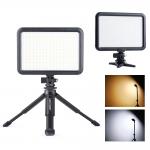
204 LED Video Light with Mini Tripod Stand, Dimmable 3200K-5600K Rechargeable
SKU: KF34.012V1
Q
I'm able to change the brightness but can't figure out how to change the colour. Can anyone help please?
Answer Question
A
Looking at the back 4 buttons. The button on the far right - press and hold power comes on. All digits come on. Two right hand digits show up to 99. These are the brightness, the two left digit are the temperature of the light.
If you press the two buttons on the left, then the intensity goes up and down.
Tap the second button from the right, press and the right two number flash.
Use the two buttons on the left to change the value up and down. Colour temperature changes from 28 -60. Low value is warmer (more cream) , higher value is colder (more blue).
That's all there is to it.
Related products

Guess you like products

Related articles
Guess you like articles


Related searches
Change Sd Card Format
Android Change Microphone Source
Change Microphone Input Iphone
Windows Camera Change Microphone
Move To The Sd Card
Change Webcam Resolution Windows 10
Lens Adapter Change Focal Length
Yi Home Camera Change Wifi
Change Write Protected Sd Card
Change Input Microphone Windows 10