What Is Dvr Mode On A Trail Camera?
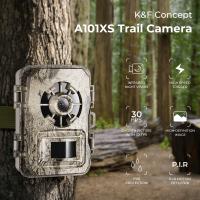
Trail cameras have become indispensable tools for outdoor enthusiasts, hunters, wildlife researchers, and anyone with an affinity for observing nature up close. Among their many features, one that piques a lot of interest and sometimes confusion is DVR mode. If you've been fiddling with your trail camera settings and stumbled across this option, wondering whether it's the holy grail of camera settings or just another checkbox, allow me to illuminate the mystery behind DVR mode on your trail camera.
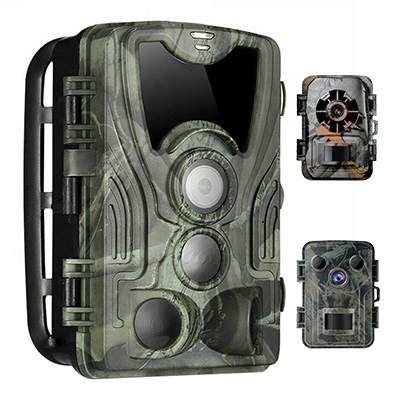
The trail camera is more than just a watchful eye in the wilderness; it’s your dependable scout, capturing moments you’d otherwise miss. To make the most of it, a solid understanding of its features is crucial. DVR mode, short for "Digital Video Recording" mode, steps beyond the basic photo-taking function and opens up a new dimension of data collection, offering you videos of wildlife in motion and their behaviors in real-time.
What Exactly Is DVR Mode, Anyway?
DVR mode allows your trail camera to record video clips instead of — or in addition to — snapping still photos. While photo mode captures a frozen moment in time, DVR mode gives life to your observations, recording events as they unfold, offering context that a static image simply cannot provide.
For example, let’s say you position your trail camera along a deer trail. In photo mode, the camera might capture a series of images showing a deer walking through the area. Sounds nice, right? Now imagine switching to DVR mode: you get a complete video of the deer wandering up the trail, pausing to inspect the foliage, looking around for predators, and picking up subtle signals such as how it interacts with its environment. This added layer of detail can be invaluable, especially for hunters trying to pinpoint patterns or behaviors, or for researchers monitoring animal health and movements.
DVR Mode vs. Photo Mode: Why Should You Care?
Understanding when and why to use DVR mode depends on your goals and the context of your tracking. Let’s break down the scenarios:
1. Behavior Tracking:
If your primary aim is to study wildlife behavior, DVR mode is your best ally. Whether it’s tracking mating signals, observing social dynamics within an animal group, or catching a predator stalking its prey, a video captures nuanced actions better than still images.
2. Situational Clarity:
Imagine your regular photo mode camera capturing an image of a bear, but the shot is blurry since it ran past the frame at high speed. In DVR mode, you would have recorded the entire sequence: the bear emerging from the underbrush, sprinting, and vanishing. Video captures the full context, minimizing data gaps and giving you a clearer understanding of what’s happening.
3. Better Identification:
Videos often provide improved identification details. With DVR mode active, you’re more likely to identify animals correctly, thanks to their movement patterns, sounds, or distinguishing features that might not be visible in still photography.
4. User Engagement:
Let’s admit it: videos are inherently more entertaining than still photos. Watching creatures in motion provides a richer, more immersive experience, whether you’re sharing clips with friends online or keeping memories of your outdoor adventures.
The Trade-Offs: DVR Mode Isn’t Perfect
As fantastic as it sounds, DVR mode isn’t without its limitations. Here are a few trade-offs that could influence how and when you use it:
1. Battery Drain:
Recording video consumes significantly more power compared to snapping photos. If your trail camera is operating in a remote location for extended periods, you may need to choose wisely to avoid prematurely draining your battery. In most cases, investing in external battery packs or solar power solutions can help offset this issue.
2. Storage Space:
Videos occupy way more storage space than photos. A series of high-definition video clips can quickly eat up your SD card, leaving little room for additional recordings. Setting lower video resolutions or using larger-capacity SD cards might be necessary when utilizing DVR mode.
3. Trigger Delay:
Some cameras might experience a brief delay between detecting movement and starting video recording. As a result, you might miss the initial few seconds of activity. Researching models with faster triggering capabilities can help combat this issue.
4. Data Analysis Complexity:
Reviewing hours of video footage can be a tedious process compared to quickly scanning through images. Depending on your objectives, balancing between video and photo capture might save you time during analysis.
Optimizing DVR Mode: Settings Matter
To maximize DVR mode, understanding your trail camera’s settings is pivotal. Here are some tips to ensure effective usage:
1. Video Length:
Most trail cameras let you adjust how long the video records after motion is detected—commonly between 5 seconds and 2 minutes. Choose lengths that balance capturing meaningful data while conserving battery and storage. For instance, 20-30 seconds is often sufficient for most wildlife activity.
2. Frame Rate and Resolution:
Opting for resolution settings such as 1080p will deliver crisp, detailed videos, but at the cost of storage space. Alternatively, lower resolutions like 720p may suffice for general wildlife observation. Likewise, higher frame rates (e.g., 30 fps) will create smoother videos, while lower frame rates (15 fps) can help extend battery life.
3. Night Vision Capabilities:
DVR mode paired with infrared or low-glow technology shines in nocturnal environments, allowing you to record animals under the cover of darkness without startling them (or attracting attention to your camera).
4. Sensitivity Adjustment:
Fine-tuning motion sensitivity ensures the camera only activates for meaningful events, avoiding false triggers caused by wind-blown leaves or other environmental factors.
5. Hybrid Modes:
Some advanced trail cameras offer hybrid settings that record both photos and videos for each detection event. Such modes provide the best of both worlds, allowing for quick scanning of images before immersing yourself in videos.
Is DVR Mode Right for You?
To decide whether to run DVR mode or stick to photo mode, consider your surveillance goals, environmental conditions, and hardware capacity:
- If you’re studying intricate animal behaviors or looking to create high-quality footage, DVR mode is a no-brainer.
- For long-term monitoring in remote areas, where battery and storage constraints are paramount, photo mode might be a better choice unless you scale up with external batteries or larger SD cards.
- For casual users or those simply wanting to monitor activity frequencies, a combination of photo and short video clips could strike the perfect balance.
A Few Final Thoughts
Using DVR mode on a trail camera is like stepping from a sketchbook into a movie theater. Instead of solitary snapshots, you receive a narrative—an unfolding story of the forest’s inhabitants. Just remember: with great video power comes great battery responsibility. Trail cameras, like nature itself, require careful calibration to yield their richest rewards.
The next time you spot DVR mode in your trail camera settings, don’t ignore it. Instead, embrace it. Experiment, see how it fits your needs, and prepare to be amazed at what your camera can capture. Just don’t blame me when you spend hours mesmerized by raccoons wrestling each other over scraps of food or squirrels engaging in elaborate acorn shenanigans. Wilderness cinema awaits you!