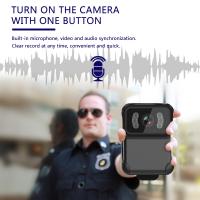
Hidden cameras can lurk anywhere, from hotel rooms and Airbnb properties to dressing rooms, offices, and even homes. These devices can capture your image, activities, and private conversations without you ever knowing. In some cases, hidden cameras can serve legitimate purposes, such as alerting owners to break-ins or keeping an eye on the dog, and they can be kept out of plain sight. However, hidden cameras should never exist in private areas to spy on, prank, or extort you.Unfortunately, hidden cameras are indeed a worrying issue in today's society. Have you ever felt your privacy threatened when staying in a hotel room, guesthouse, or even a public restroom? But don't worry, I will guide you on how to use a hidden camera detector to protect your privacy and peace of mind.
What is a Spy Camera Detector?
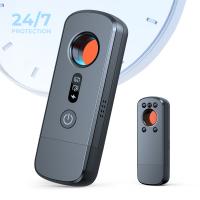
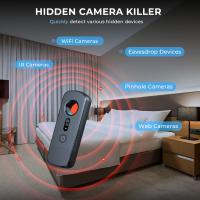
A spy camera detector is a device designed to detect the presence of covert surveillance cameras in a specific area. These devices come in various forms, including handheld detectors, professional-grade detectors, and smartphone apps. They work by detecting the radio frequency signals or lens reflections emitted by hidden cameras.
Main Types of Spy Camera Detectors
Type | How It Works | Common Uses | Pros | Cons |
RF (Radio Frequency) Detector | Detects wireless signals (Wi-Fi, Bluetooth, RF) from hidden cameras or bugs. | Hotel rooms, offices, meeting rooms. | Easy to use; detects most wireless devices. | Cannot detect non-transmitting (wired or off) cameras. |
Lens Detector (Infrared/Optical) | Uses LED light to reflect camera lenses (visible through a viewfinder). | Bathrooms, bedrooms, changing rooms. | Works even if the camera is off; visual confirmation. | Requires manual scanning; short detection range. |
Magnetic Field Detector | Detects magnetic fields from wired cameras or recording devices. | Vehicle inspections, hidden wiring checks. | Finds non-wireless devices; simple operation. | Limited range; may give false alarms. |
Combined (Multi-Function) Detector | Combines RF, lens, and magnetic detection in one device. | Comprehensive sweeps in hotels, offices, or personal spaces. | Versatile and efficient; detects multiple threats. | More expensive; may require calibration. |
Mobile App or Smart Detector | Uses phone sensors or camera to detect reflections or network activity. | Quick personal checks. | Convenient and portable. | Less accurate; limited detection ability. |
How to Use a Spy Camera Detector
Now that you’re familiar with the different types of hidden camera detectors let’s dive into how to use one effectively. I’ll provide you with a step-by-step guide on using a handheld hidden camera detector, as it is the most common type used by individuals.
Step 1: Familiarize Yourself with the Detector
Before you start scanning for hidden cameras, take the time to familiarize yourself with the detector’s controls and settings. Read the user manual that comes with the device to understand how to operate it properly. Most handheld detectors have simple one-touch controls for scanning and adjusting sensitivity levels.
Step 2: Turn On the Detector
Once you’re comfortable with the detector’s controls, turn it on and hold it upright. Make sure you are in a quiet environment free from interference to get accurate results. Some detectors may require you to calibrate them before use, so follow the instructions provided in the user manual.
Step 3: Start the Scanning Process
To begin scanning for spy cameras, slowly move the detector around the area you want to inspect. Pay close attention to areas where hidden cameras are commonly found, such as smoke detectors, wall sockets, mirrors, and other objects that are in line-of-sight. The detector will emit a sound or visual alert if it detects any suspicious signals.
Step 4: Adjust Sensitivity Levels
If the detector detects a hidden camera signal, you can adjust the sensitivity levels to hone in on the exact location. Increase the sensitivity gradually until you pinpoint the source of the signal. Remember that false alarms can occur due to interference from other electronic devices, so take your time to ensure accurate detection.
Step 5: Inspect and Investigate
Once you’ve pinpointed a potential spy camera, inspect the area carefully to confirm its presence. Look for any suspicious signs such as blinking lights, unusual wires, or unusual objects that don’t belong. If you’re unsure, you can use a flashlight to illuminate the area for a closer inspection.
Step 6: Report and Take Action
If you confirm the presence of a hidden camera, it’s essential to report it to the relevant authorities immediately. In the case of hotels or rental properties, notify the management and request a different room or accommodation. Do not try to remove the camera yourself, as it may be illegal and compromise any ongoing investigations.
If you don't have a Spy Camera Detector, that's okay. Here are some tips for how to detect hidden cameras via manual inspection:
Use a flashlight: Try locating hidden cameras by carefully running a flashlight around the room—keeping it at eye level— and looking for tiny blue or purple reflections that shine when hit by a ray of light. If you see any, it’s likely a camera lens.
Investigate LED lights: Small lights shining in a dark room could indicate a hidden camera. To protect yourself, unplug the device if it’s unnecessary, or look the device up online to find out what the light is for.
Look for objects that don’t fit in: Check decorative items that may seem out of place—such as random stuffed animals in a sleek or modern Airbnb. Inconspicuous objects like alarm clocks, smoke detectors, and picture frames can be used to hide cameras.
Scrutinise wires: With so many IoT devices and home electronics these days, you might be inclined to look past wires. However, these could run to hidden cameras that require electrical power.
Search for holes: People can tuck cameras away in the smallest of holes, so check for gaps in walls, furniture, decor, and fixtures where a camera might be hiding.Test mirrors: You can sometimes place your finger against the mirror to check for hidden cameras. The general rule of thumb is that if there’s a gap, it’s a real mirror; if it looks like your finger and reflection are touching tip to tip, it could be a two-way mirror or masking a hidden camera.
FAQs about how to check for hidden cameras
Still have questions about how to find a hidden camera? Wondering how to deal with one? Read through these answers to some commonly asked questions about hidden cameras.
What do hidden cameras look like?
Hidden cameras can come in all shapes, sizes, and colours. Somebody may hide or disguise them as common household objects, such as smoke detectors, outlets, or USB chargers. But all hidden cameras will have some form of camera lens.
Is it legal for someone to watch me with a spy cam?
In the UK, there are restrictions on installing cameras in areas where you have the right to expect privacy, like bathrooms, dressing rooms, and bedrooms. However, cameras can be found outdoors and in common areas such as hotel lobbies or waiting rooms. Beyond that, hotels, stores, and rental companies might have more stringent privacy policies.
What should you do if you detect a spy camera?
If you do find a hidden camera, your instinct may be to remove or disconnect it, but don’t. Doing so could destroy fingerprints that would be useful in an investigation. Instead, follow these steps:
Take a picture of the hidden camera for documentation.
Carefully block the camera’s view with a towel or blanket.
If you can't cover the device, move yourself and your belongings away from the camera’s view.
Contact local law enforcement and follow their instructions.